
Recipient onboarding
Help the recipient know what to expect after receiving Fablr.
Who this is for
Gift buyers and helpers introducing Fablr to the person whose stories will be recorded.
Before you start
- Know which path this is. On the Managed Storyteller path the buyer holds the account and the recipient needs nothing but the private recording link they were sent.
- Managed Storyteller path only: have that private recording link to hand. There is no code to redeem and no sign-in.
- Account path only: have the gift email or certificate nearby, and note that the access code is not case-sensitive.
- Let the recipient decide when they are ready to record.
What to do next
- Explain the gift simply: this is a way to preserve stories in their own words.
- Decide who holds the account: the buyer on the Managed Storyteller path, or the recipient on the account path.
- Managed Storyteller path, first visit: open the private recording link the buyer sent. A short consent screen comes up before recording. Tick the box confirming the storyteller is over eighteen and comfortable being recorded, press Confirm and continue, then press the record button and start talking. Later visits normally go straight to the record button. If the consent notice is updated, or the buyer reissues the link, that same short screen appears again.
- Managed Storyteller path: stop after that step. The steps and the buttons below are for the account path only, and neither applies to a private recording link.
- Account path: open the gift email, certificate link, QR code, or the access-code start page.
- Account path: enter the access code from the certificate or gift message.
- Account path: create an account or sign in if they already have one.
- Account path: open the voice conversation page.
- Either way, keep the first session short and come back later for more memories.
What you should see
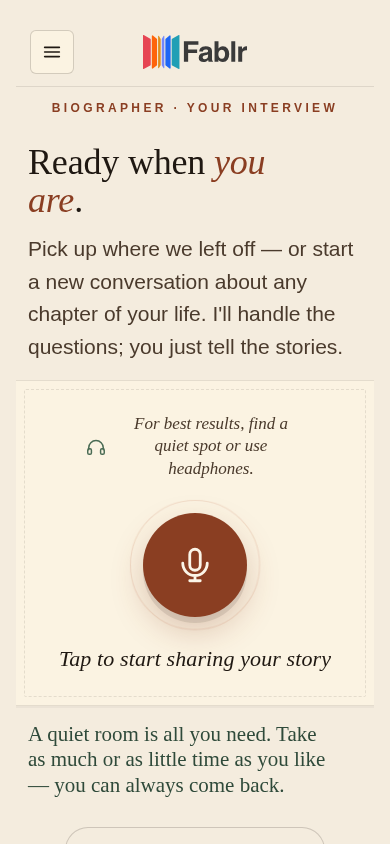
How you know it worked
If something goes wrong
Check the characters, enter the code again, and ask for email follow-up if it still fails. On the Managed Storyteller path there is no code to enter at all, so check whether the recipient should be using their private recording link instead.
That is not the link. Ask the buyer to resend the storyteller link from their account, and do not send the recipient to the sign-in or access-code pages.
Use sign in instead of creating a second account.
Pause. The gift can still be used when they feel ready.
Still need a hand?
Reach our support team through the contact page. We are glad to help, and you do not need to sign in first.
Go to the contact page